G-Field for Telecom
Telecom tower and fibre route survey app
Record towers, equipment and network faults, survey fibre routes and log coverage checks with location on every record. G-Field's Telecom forms suit operators, infrastructure providers and rollout contractors.

Telecom
Telecommunications network surveys
What the Telecom forms capture
The Telecom sector opens with 5 predefined tables, plus Others for a custom form:
- Telecom Tower Register
- Network Coverage Survey
- Fiber Route Survey
- Telecom Equipment
- Network Fault Register
- Others (custom form)
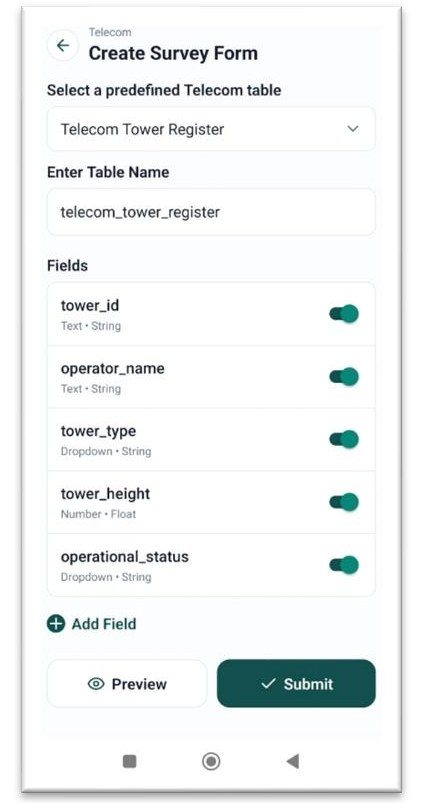
Fields in the Telecom Tower Register
The default fields shown in the app include:
- tower_id
- operator_name
- tower_type
- tower_height
- operational_status
Switch any default field off, or use Add Field to add your own: Text, Dropdown, Radio, Checkbox, Number, Date, Image or Video, stored as String, Integer, Float or Boolean, with an optional unit.
Recommended geometry
Every G-Field form stores one geometry type, following the OGC Simple Features model, with WGS 84 latitude and longitude.
Point
RecommendedTowers, equipment, fault locations and coverage test points
LineString
Fibre routes and duct alignments
Polygon
Tower site compounds
Telecom survey workflow in 5 steps
- Open Telecom, choose Create Form and pick Telecom Tower Register, Fiber Route Survey or another table.
- Keep fields such as operator, tower type, tower height and operational status; add a unit such as “m” to heights.
- Use Point for towers and faults, LineString for fibre routes.
- On site, locate your position, set the marker, complete the form and Submit.
- Filter by date in View Survey, view records on the map and export the CSV.
Try G-Field for telecom surveys
Install the app, open the Telecom sector and build your first form on the phone.
- Questions or a team rolloutinfo@garudalytics.com
- Supportsupport@garudalytics.com